
-
Vendor:Ubiquiti
UniFi Intercom Viewer
UA-Intercom-ViewerRegular price From $267.00Regular price$274.00Sale price From $267.00Ubiquiti UA-Intercom-Viewer UniFi Intercom Viewer
Regular price From $267.00Regular price$274.00Sale price From $267.00Ubiquiti UA-Intercom-Viewer UniFi Intercom Viewer
Regular price From $267.00Regular price$274.00Sale price From $267.00Sold out -
Vendor:Ubiquiti
UniFi G3 Intercom Terminal
UA-G3-IntercomRegular price $717.00Regular price$714.00Sale price $717.00Sold out -
Vendor:Ubiquiti
UniFi Access Intercom
UA-IntercomRegular price $582.00Regular price$582.00Sale price $582.00Sold out



See who’s there, talk and let them in from anywhere
Video Intercoms That Bring the Front Door to You
An audio-only buzzer tells you someone is outside. A UniFi video intercom puts a face to every ring, opens a two-way conversation and unlocks the door with a tap. Because they’re built into UniFi Access, the intercoms work alongside your locks, readers and user permissions as one door access system. Every entrance, from an apartment lobby to a vehicle gate, is managed in the same place, with no per-door software licences.
Find the Right Intercom for Your Entrance
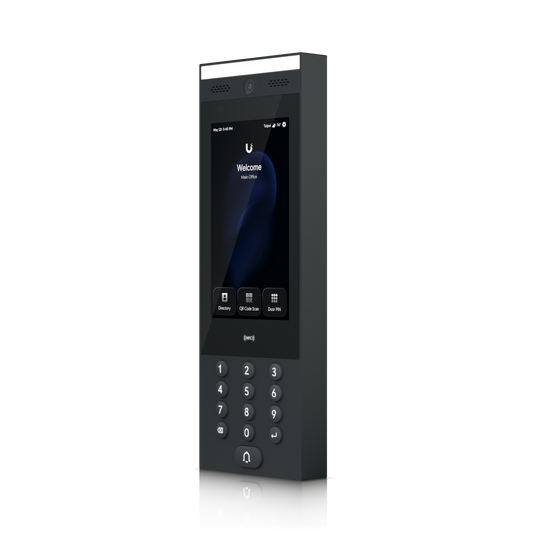
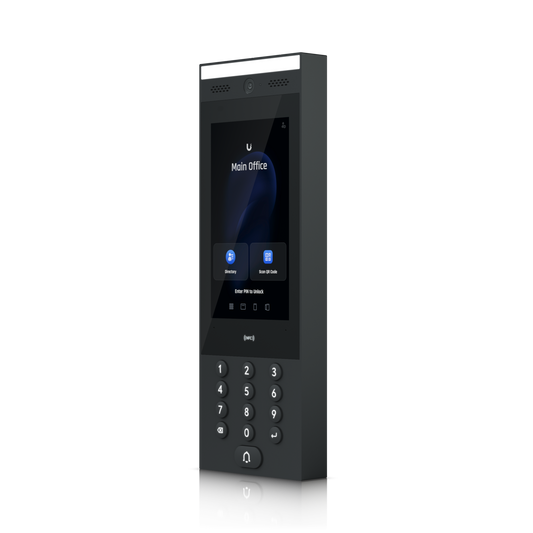
G3 Intercom. The flagship entry terminal pairs a 7" touchscreen, rated up to 1,000 nits for clear viewing outdoors, with an 8 MP sensor that delivers tall, portrait-format HD video of every visitor. It supports the widest range of credentials in this collection: NFC cards and fobs, PIN codes, QR codes, face unlock, mobile app unlock and Touch Pass. Touch Pass lets people get in with a tap of an iPhone, Apple Watch or Android phone, using credentials stored in Apple Wallet or Google Wallet.
Intercom. It shares the G3’s rugged, IP65-rated design, 7" touchscreen, built-in camera and two-way audio. It supports NFC cards and fobs, PIN codes, mobile unlock and face unlock. It’s a strong fit for sites that don’t need wallet-based credentials.
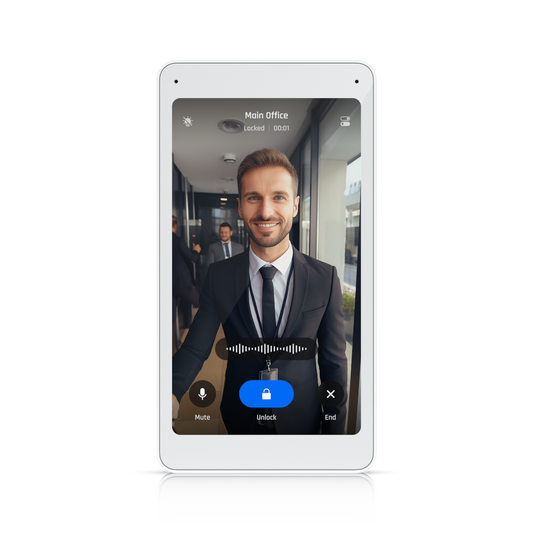
Intercom Viewer. A slim 5" HD indoor display that turns any apartment, reception desk or security office into an answering station. See visitors live, talk through the built-in speaker and microphone, and unlock with a tap. One Viewer can answer multiple intercoms and compatible Pro readers. It mounts on a wall or gang box, or sits on a desk with the optional table stand. Buy it individually or in a 3-pack for multi-unit buildings.
Answer From a Viewer, an App or Any Phone
Intercom calls don’t have to ring a single screen. Each doorbell or directory entry can ring Intercom Viewers, the UniFi mobile apps, regular phone numbers, SIP phones (including UniFi Talk models) and door chimes, all at once if you like. Phone-number receivers need no app at all: answer the call and press * to open the door. Up to three call groups roll over automatically after 10, 15 or 20 seconds without an answer. Receiver schedules send daytime calls to the front desk and after-hours calls to whoever is on duty.
Built for Apartments, Offices and Gates
- Apartments and strata buildings: Visitors tap a resident’s name in the on-screen directory or enter a short dial code, and the call goes straight to that unit’s Viewer or phone. A dedicated delivery option gives couriers their own way to call in.
- Offices and commercial spaces: Route visitors to reception, escalate to security when calls go unanswered, and brand the intercom screen with your logo, welcome text and background.
- Gates and car park entrances: IP65 weatherproofing, an operating range of -30°C to 60°C and an included gooseneck pedestal adapter make the intercoms ready for drive-up installs. Pair one with the Gate Access Starter Kit for vehicle gate control.
Simple to Install, Easy to Manage
Every device runs on a single PoE cable. The intercoms connect to UniFi Access Hubs, which power them and control the lock. Optional sunshield, flush, angle and wedge mounts adapt the intercoms to almost any wall. The Intercom Viewer supports existing two-wire Ethernet setups, so retrofits don’t require rewiring. Once the devices are adopted, everything is managed in UniFi Access: users and credentials, schedules, call routing and activity logs with video captures. All three devices are UL 294 certified and NDAA compliant.
Frequently Asked Questions
Do UniFi intercoms require a subscription?
No per-door software licence is required. The intercoms are managed in UniFi Access on a compatible UniFi console. Touch Pass wallet credentials are optional and priced per user per year after your first 10 complimentary passes.
Can I answer the intercom without installing an app?
Yes. Add any phone number as a call receiver, then answer the call and press * to unlock the door.
Can one Intercom Viewer handle more than one entrance?
Yes. A single Viewer can receive calls from multiple intercoms and Pro readers, and each intercom can ring multiple Viewers.
What’s the difference between the G3 Intercom and the Intercom?
Both share the 7" touchscreen, camera, two-way audio and IP65 housing. The G3 Intercom adds Touch Pass support for Apple Wallet and Google Wallet.