
-
Vendor:Ubiquiti
UniFi UniFi Travel Router
UTRRegular price $147.00Regular price$175.00Sale price $147.00Sold out -
Vendor:Ubiquiti
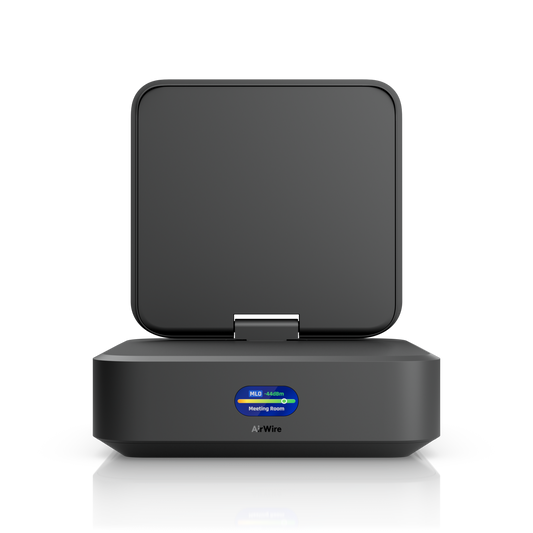
UniFi AirWire
U-AirWireRegular price $350.00Regular price$373.00Sale price $350.00Sale


Take your UniFi network further: across the room or around the world
Beyond the Access Point
Most of a UniFi network lives on the ceiling and in the rack. Special Devices take care of the edges. One edge is the desk that needs multi-gigabit speed where no cable can reach. The other is the hotel room, rental or job site where you need your own secure network for a few days. This collection brings together the AirWire WiFi 7 client adapter and the UniFi Travel Router family, each built to carry the UniFi experience past the reach of your access points.
AirWire: Multi-Gigabit WiFi 7 Without the Cable Run
Plenty of WiFi 7 laptops and PCs list Multi-Link Operation (MLO) on the spec sheet, but many only hop between bands instead of using them together. AirWire (U-AirWire) is built for the real thing. Its STR (Simultaneous Transmit and Receive) MLO keeps full-duplex links running on 5 GHz and 6 GHz at once. That combines bandwidth, lowers latency and keeps the connection steady when one band gets congested.
- Four spatial streams (2x2 on 6 GHz plus 2x2 on 5 GHz), with link rates up to 5.8 Gbps on 6 GHz (320 MHz) and 4.3 Gbps on 5 GHz (240 MHz)
- 11 dBi high-gain, adjustable antenna you can aim at your nearest access point for extended range
- Connects to your computer over USB-C and appears as a 5 GbE network adapter (USB 3.2 Gen 2), powered via USB PD
- A dedicated scanning radio for real-time spectral analysis, plus wireless meshing support
- 0.96" status display, automatic linking to nearby UniFi WiFi for quick setup, and management in UniFi Network 10.2 or later
AirWire suits gaming PCs, video-editing and design workstations, and home offices where running Ethernet means drilling through walls or asking the landlord. For best results, pair it with a UniFi WiFi 7 access point broadcasting on 6 GHz. Connect it to a USB-C port with USB 3.2 Gen 2 speeds and 15–20 W of USB PD power. Good to know: AirWire works on 5 GHz and 6 GHz only.
UniFi Travel Router: Your Network, Packed in Your Bag
The UniFi Travel Router (UTR) turns the connection at any hotel, short-stay rental, conference venue or client office into your own private network. At just 12.5 mm thick and 89 g, it slips into a laptop sleeve while still covering what matters on the road:
- Three ways online: Ethernet, WiFi (including hotel networks with a captive-portal sign-in, completed from your phone) or USB tethering from an iPhone or Android phone, with uplink priority you control
- Dual-band WiFi 5 (2x2 MIMO) for laptops, phones, tablets and streaming sticks, plus two Gigabit Ethernet ports
- Built-in WireGuard and OpenVPN clients, so every connected device is protected without setting up a VPN on each one
- Teleport for a secure link back to your UniFi network at home or in the office
- Firewall and port forwarding, a 1.14" status display, and USB-C power (5V/2A; power adapter not included)
- Setup and control from the UniFi mobile app; no UniFi account is required, and it also runs in stand-alone mode
Paired with your UniFi gateway, it extends your own network to wherever you unpack.
UniFi Travel Router Long-Range: Extra Reach for Tough Spots
The UTR-LR is the same travel router with an integrated, foldable Super Antenna. Maximum transmit power rises from 13 to 20 dBm on 2.4 GHz and from 15 to 23 dBm on 5 GHz. That extends range when venue WiFi is weak, the space is large or you’re working somewhere remote, from holiday houses to caravans and site offices. It’s a little thicker at 19.5 mm and 126 g, with the same ports, VPN support and app control as the standard model.
Which Special Device Is Right for You?
- AirWire: multi-gigabit, low-latency wireless for a fixed desk, PC or workstation on a UniFi WiFi 7 network.
- UniFi Travel Router: the lightest, most compact way to take a secure network on business trips and holidays.
- UniFi Travel Router Long-Range: maximum reach for weak hotspots, large spaces and remote locations.
All three are NDAA compliant and set up in the familiar UniFi apps, so extending your network to a new desk or a new city doesn’t mean learning a new system.